
11//7/2026
A TikTok money calculator gives you an estimate of what a creator might earn from views, LIVE Gifts and brand deals. It does not show real payouts. TikTok keeps a creator’s balance private, so any online earnings check, including a username-based one, works from public numbers and assumptions. Used with that in mind, it is a quick and useful way to size up an account.
This guide explains how these calculators work, how to use one properly, which numbers actually matter, and how to spot an earnings website that is not worth your time.
Quick Answer
- Can a calculator show exact earnings by username? No. It can only estimate, using public data such as followers and views.
- Can it estimate LIVE earnings? Yes, as a range, if you give it a realistic Gift value and a creator share.
- Is an online earning check accurate? It is as accurate as its assumptions. Treat the result as a range, never as a fact.
- Who sees the real number? Only the creator, inside their own TikTok account.
What Does a TikTok Money Calculator Actually Do?

A calculator takes a few inputs and multiplies them by an assumed rate. That is all. There is no secret access to TikTok’s payment system behind it.
Most calculators look at some mix of these inputs:
- Follower count
- Average views per video
- Engagement (likes, comments, shares)
- LIVE Gift activity
- Posting frequency
The output is a range, such as “$200 to $500 a month”. The range exists because the rates behind it are not fixed. Two calculators can disagree by a wide margin and both be “reasonable”, simply because they assume different rates.
Does a Username Search Work?
Partly. When you type a public username, a tool can read what anyone can see on that profile: followers, total likes, and recent video views. It then plugs those numbers into its formula.
What a username search cannot see:
- The creator’s Diamond balance
- Their private LIVE rewards history
- Money already withdrawn
- Brand deal fees and affiliate commissions
So a username result tells you roughly what an account of that size and activity could earn. It does not tell you what that person did earn. If you want the longer explanation, read our guide on how to check TikTok LIVE earnings by username.
The Three Income Streams You Need to Estimate
TikTok income is not one number. It is usually three separate streams, and a good estimate treats them separately.
1. Creator Rewards (video views)
TikTok’s Creator Rewards Program pays based on qualified views on eligible videos. Requirements have included a minimum follower count, a minimum number of recent views, videos above a minimum length, and the creator being 18 or older in a supported country. These rules change, so check TikTok’s current program page before relying on them.
Payout per 1,000 qualified views varies a lot by content type, audience country and watch time. Many creators report figures well under a dollar per 1,000 views, but there is no official fixed rate. For planning, use a range rather than a single rate.
2. LIVE Gifts
Viewers buy Coins and send Gifts during a LIVE. The creator collects Diamonds, which can become rewards if the creator is eligible. TikTok does not publish one universal formula that turns Gifts into a final payout, so calculators assume a creator share. What a viewer spends is never the same as what the creator receives. For more on this, see our breakdown of how TikTok LIVE earnings work.
3. Brand deals and affiliate income
For many mid-size creators this is the largest stream, and it is the one no calculator can see. Sponsorship fees depend on niche, audience quality, engagement and negotiation. Some marketers quote rough rules of thumb based on followers, but real deals vary widely, so treat any such rule as a starting point for a conversation.
Worked Examples (Hypothetical Numbers)
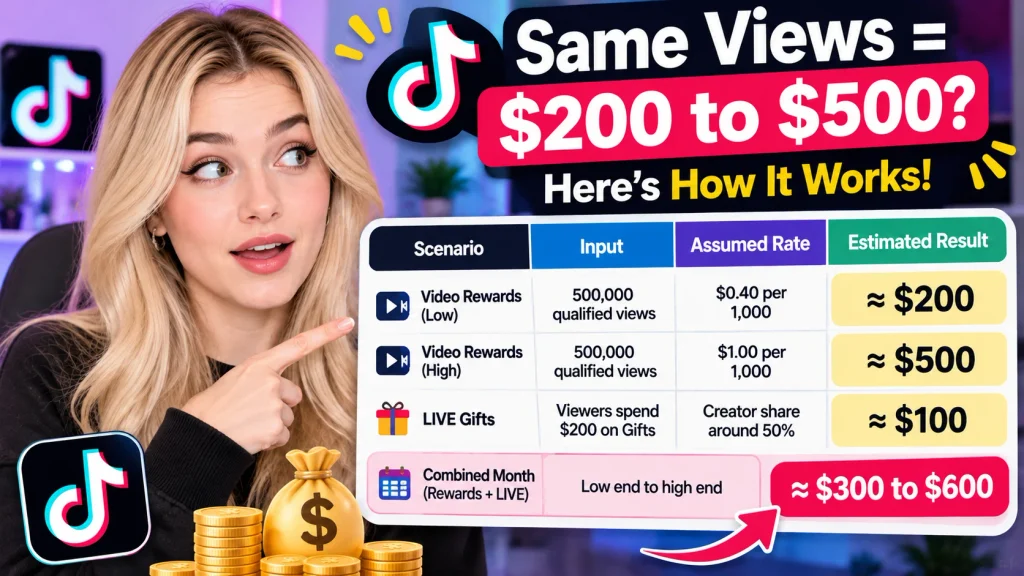
These examples show how the maths works. The rates are assumptions for illustration, not TikTok’s official figures.
| Scenario | Input | Assumed rate | Estimated result |
|---|---|---|---|
| Video rewards, low | 500,000 qualified views | $0.40 per 1,000 | about $200 |
| Video rewards, high | 500,000 qualified views | $1.00 per 1,000 | about $500 |
| LIVE Gifts | Viewers spend $200 on Gifts | Creator share around 50% | about $100 |
| Combined month | Rewards + LIVE | Low end to high end | about $300 to $600 |
Notice that the same views give a $200 to $500 spread. That spread is the honest answer. A calculator that shows you a single number like $1,847.32 is not more precise, it just hides the range.
How to Use a TikTok Money Calculator (Step by Step)
- Gather real inputs. Use average views from the last 10 to 20 videos, not one viral hit.
- Enter followers and views. Add engagement if the tool asks for it.
- Add LIVE activity separately. Estimate Gift value per LIVE and how many LIVEs happen per month.
- Run low and high scenarios. Change the assumptions and compare the results.
- Read the assumptions. If the tool does not tell you what rate it used, be careful.
- Treat the output as a range. Round it and write it down as “between X and Y”.
You can try this with our free TikTok Money Calculator.
How to Judge an Online TikTok Earnings Website
There are many creator earnings websites, and quality varies. Use this checklist before you trust one.
Good signs
- It states clearly that results are estimates
- It explains its assumptions or lets you change them
- It shows a range, not just one exact figure
- It asks only for a public username or simple numbers
Red flags
- It asks for your TikTok password or login
- It promises the “exact earnings of any account”
- It asks you to download an app or complete surveys before showing results
- It claims official partnership with TikTok without proof
No legitimate tool needs your password to estimate earnings. If one asks, close the page.
Common Mistakes When Estimating TikTok Income
- Using one viral video as the average. Use a recent average instead.
- Treating Gift spend as creator income. The creator’s share is lower.
- Ignoring country. Audience location affects payout rates.
- Forgetting eligibility. Not every account qualifies for rewards.
- Counting only TikTok money. Many creators earn more from sponsors and products.
- Forgetting costs and tax. Estimates are before expenses and taxes.
Frequently Asked Questions
Is there a TikTok money calculator that works by username?
Yes. Several tools accept a public username and estimate income from visible data like followers and views. The result is an estimate, because private balances and payouts are not accessible.
Can I do a TikTok earning check online for any account?
You can run an estimate for any public account. You cannot confirm what that account actually earned. Only the account owner can see real figures in the app.
How do I estimate TikTok LIVE earnings with a calculator?
Enter the approximate Gift value per LIVE and the number of LIVEs per month, then apply a creator share assumption. Run a low and a high case to get a range.
Are TikTok creator earnings websites accurate?
They are accurate only to the extent that their assumptions match reality. They are best for planning and comparison, not for verifying income.
How do I check my own TikTok earnings?
Eligible creators can open the app, go to Profile, tap the Menu, choose Balance, and view their rewards there. Menu labels can differ by region and app version.
How many followers do I need to make money on TikTok?
There is no single number. Creator Rewards has its own eligibility requirements, while brand deals depend more on engagement and niche than raw follower count.
Final Thoughts
A TikTok money calculator is a planning tool, not a bank statement. Use a username search to get a rough sense of scale, run low and high scenarios, and keep video rewards, LIVE Gifts and brand deals separate in your head. If a website promises exact earnings for any username, be sceptical.
Ready to run your own numbers? Try the free TikTok Money Calculator and use the result as an estimate range.
3 comments